Understand Prague Public Transport Timetables
Find Bus, Train, Tram Timetables and Routes. You will need Adobe Acrobat software to open the examples and see timetables online. This software is free at adobe.com.
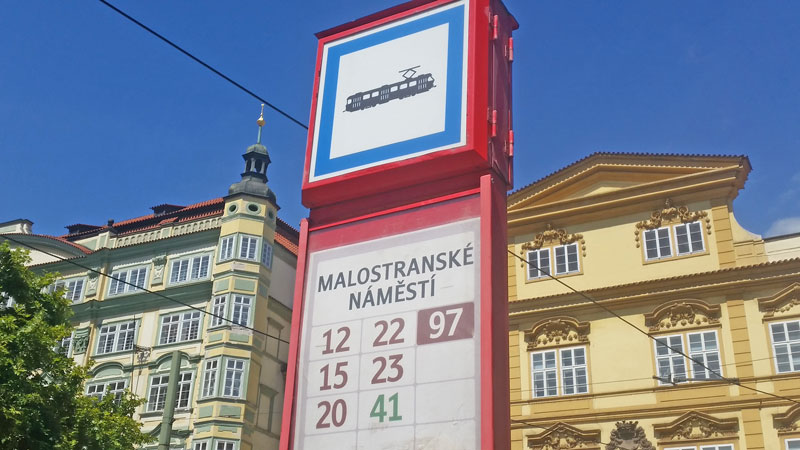
If you do not know the line number of the tram/bus that you want but you do know the hotel location or street name, use the How to Use Mapy.cz guide to generating an interactive map and follow the guide down to the bottom where you will be able to find the closest bus/tram stop to your accommodation i.e. hover your mouse over the stop icon and you’ll see the number of the route and stop name.
If you’ve got the line number of the bus/tram then go to the link below to begin looking for Prague Public Transport Timetables. NOTE: FROM MAY 2017, THE NIGHT BUS SERVICE NUMBERS ARE 9xx AND THE NIGHT TRAM SERVICE NUMBERS ARE 9x. Old guides may still show the old 5xx and 9x routes etc.
Click the link to the DPP Timetable generator http://spojeni.dpp.cz/ZjrForm.aspx?cl=E5
1) Next to “Line”, enter the line number i.e. for an example type in 22.
2) Select a date. Remember that Mon-Fri timetables will be different to Sat-Sun timetables.
3) Click the “search” tab once to be able to define the stop info that you want on that line.
3a) The screen is now showing the desired line in the desired direction.
3b) If you want the whole line in the opposite direction then go to the bottom of the page and click the “opposite direction” button.
4) On the left is a list of all the stops on the line. At this point you can create a pdf document for the whole line or click on the stop you will be using and then create the pdf.
5) To create the pdf there are two ways. First, seems simple enough in that at the base of the page you click the PDF button (but often this does not work) so how I do it is to “Print” and in the printer section you “Save as PDF”.
If you want to redefine your selection or select another route, go back to the webpage and click on the “Find timetable” tab at the top of the page.
NOTE: If you have errors when you try to get the PDF version, click on the Czech flag to change the language and then click the PDF button again. This should work.
Lets take the Prague Tram 22 example PDF Prague public transport timetable which will look the same as the PDF that you just created. In this case to Number 22 Tram but this is what you download online. The real thing looks a bit different
How to Read Prague Public Transport Timetables
This is a really basic explanation of how to read a Prague Tram timetable i.e. point-to-point on the same line from one really popular Prague Attraction to another. I’m assuming that you have a travel pass, validated ticket or blank ticket which you will validate on the tram. In this example I’m using the popular tram 22 and I am simulating how you get from Malostranske Namesti (Charles Bridge) up the hill to the Prague Castle.
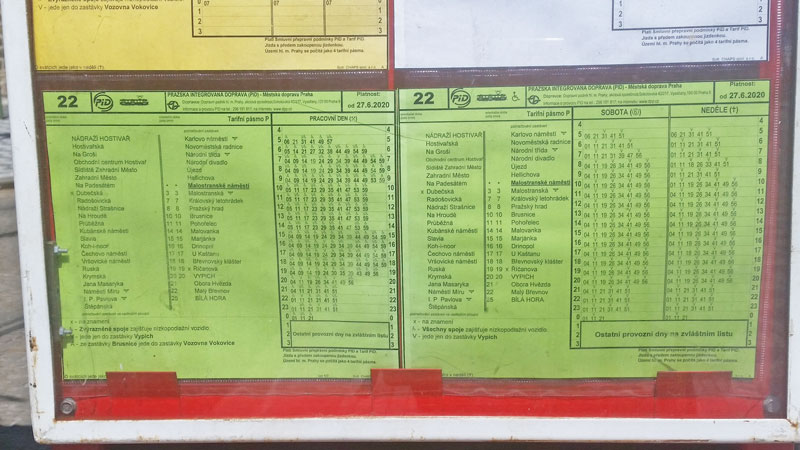
So you are at a tram stop looking at a load of sheets on the board because it may have multiple tram lines running through it. I want the 22 line so here I’ve picked out two sheets with the number 22 in the top left corner.
Day of the Week
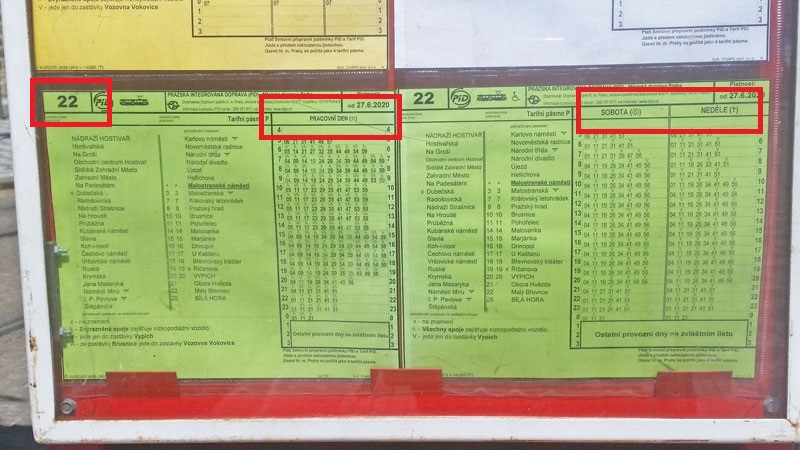
There are two sheets because one will say “Pracovni Den” (weekdays) and the other will be split “Sobota” (Saturday) and Nedele (Sunday) so the first thing you have to do is look at the correct sheet depending on the day of the week. You’ll see on the weekday sheet that in the peak periods you can expect your tram every 5 or 6 minutes whereas on the weekend you might have to wait a little longer but not more than 8 minutes.
Where Are You Now
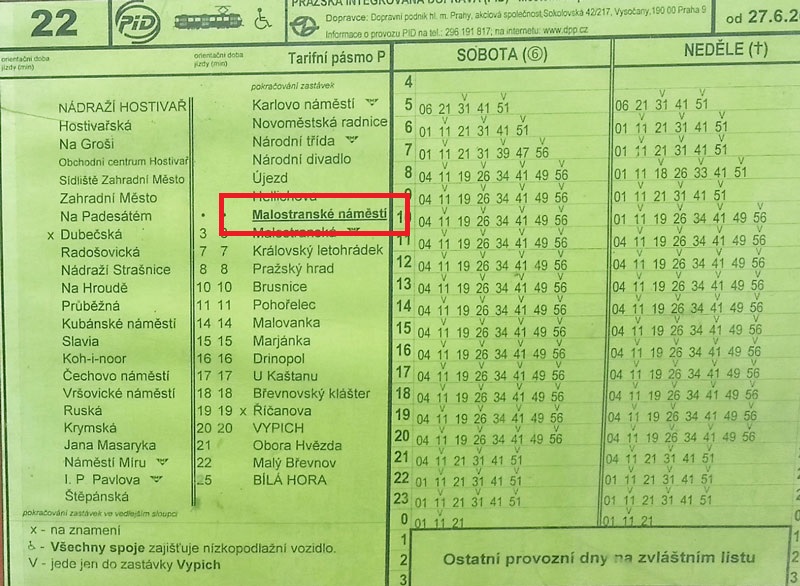
If you look up at the top of the stop sign you’ll see the stop name. On the sheet this corresponds to the bold text underlined stop name.
Where Are You Going
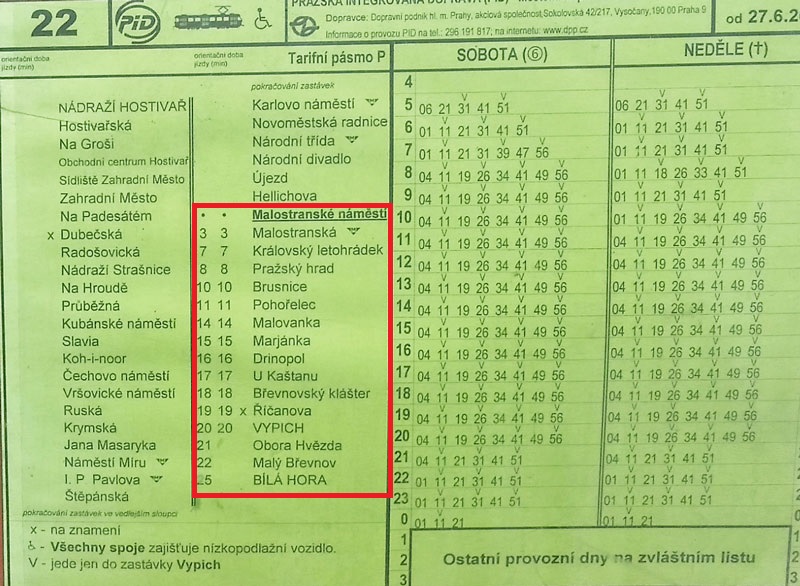
In this example we are going to Prague Castle (Prazsky Hrad). Everything listed BELOW the stop name is where you will be going. So if you are looking at a sheet which has Prazsky Hrad ABOVE the stop name then you are on the wrong side of the road. The number on the left is the number of minutes from this stop to that one. In this example we are going to Prague Castle which is the third stop (Prazsky Hrad) and it says the journey time is 8 minutes.
When’s the Next Tram
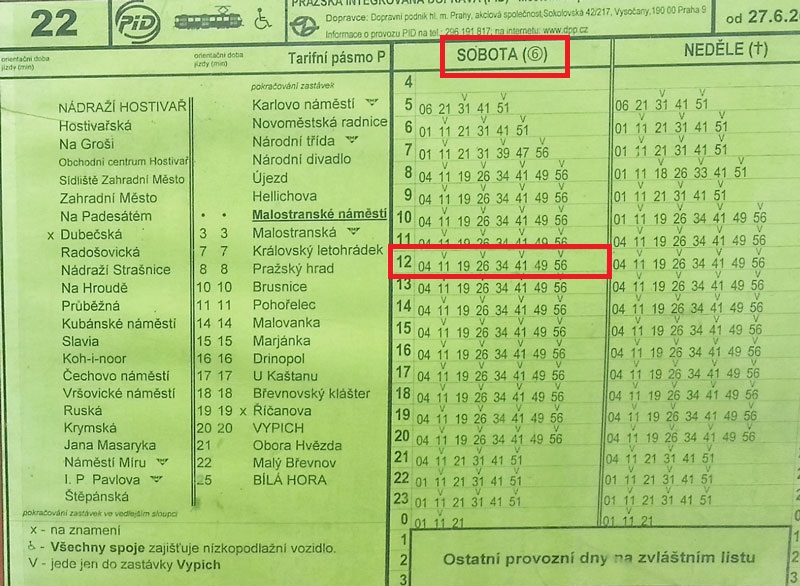
Let’s say it’s Saturday (Sobota), you’ve looked at your watch and it says 1215. Under the Sobota column on the left are bold numbers 4, 5, 6, 7 etc which correspond to hours of the day. Find the “12” and run your finger across to the right to find the minutes past that hour i.e. 4, 11, 19….. In this case it says that the next 22 tram is arriving at 1219. TIP: on the 22 going to Prague Castle get as close to the front of the tram as possible.
Notes and Restrictions
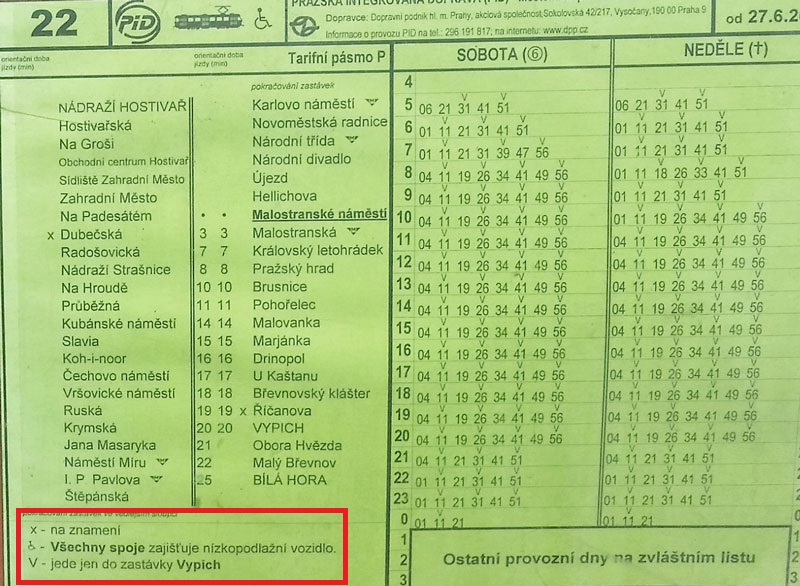
In this example some of the tram times have a “V” above them, there might have been a disabled sign or a number etc so there is an info section bottom left. This sheet is telling us three things.
1) On the list of stations on the route the one called Ricanova has an “x” beside it. It means that it is a request stop and the driver will only stop if the bell/button is pushed.
2) All Trams on this line are modern and suitable for wheelchair users hence why there are no other disabled signs on the times.
3) The 22 line officially goes to Bila Hora but three stops before the end is a “turnaround” stop at Vypich. So any time with a “V” above it is only going as far as Vypich.
So it’s simple to find and understand Prague Public Transport Timetables:
Find the route number that you want.
Get the timetable.
Pick the right day.
Find your stop.
Read across the row to find the next time.
Read down the column to find where you want to go and work out how long it will take.
The above can only be used if you know the bus/tram line number. Below is another method of finding routes but you’ll need to insert valid start and end points. My advice is to spend a bit of extra time finding the route that you’ll be on or check the Recommended Prague Apps as that has a couple of timetable/planner options.
Prague Public Transport Timetables – No Line Knowledge Method
This is not recommended unless you know the exact names of start and finish points. This option mainly deals with bus and train routes. A map option is available but you would again need some knowledge of Prague geography to make use of it. It’s better to use the previous method to identify the line and/or stop name and use that information in this method.
Click the Connection finder http://spojeni.dpp.cz/ConnForm.aspx?cl=E5 to begin the search.
You have arrived at the main search page for transport within the Czech Republic and internationally.
1) From. Enter the name of the street/town.
2) To. Enter the name of the street/town.
3) Select only if you intend to break your journey at a defined point i.e. From:Prague, To:Cheb, Via:Karlovy Vary.
4) Select the date of travel (if known or else pick the day of the week etc)
5) Click “direct” if you want point-to-point travel or enter the maximum number of changes which will give options for changing trains and/or changing from train to bus etc.
6) Click “search”.
This page contains, in time order, your travel options and extra info. In the following example I asked for a route from Prague to Cheb via Karlovy Vary and was given a direct bus route among the options;
Date – 18.11.
Start Point – Prague, Dejvicka
End Point – Karlovy Vary, terminal MHD
Departure Time – 11:45
Arrival Time – 13:49
Route number 142105 7 (a little symbol shows if it is a bus or train route) and you can click the link to see the route stops i.e. this route stops at the airport before going on to Karlovy Vary.
Journey time, distance and price (with discount card) – 2 hrs 4 min, 123 km, 130,- Kc.
Route Frequency – runs daily.
So my advice is to start with a general search and then refine as necessary.
My Own Guided Tours – Cheaper Than You Think!